Live Preview

Live Preview allows you to preview static web projects within the editor or in an external browser.
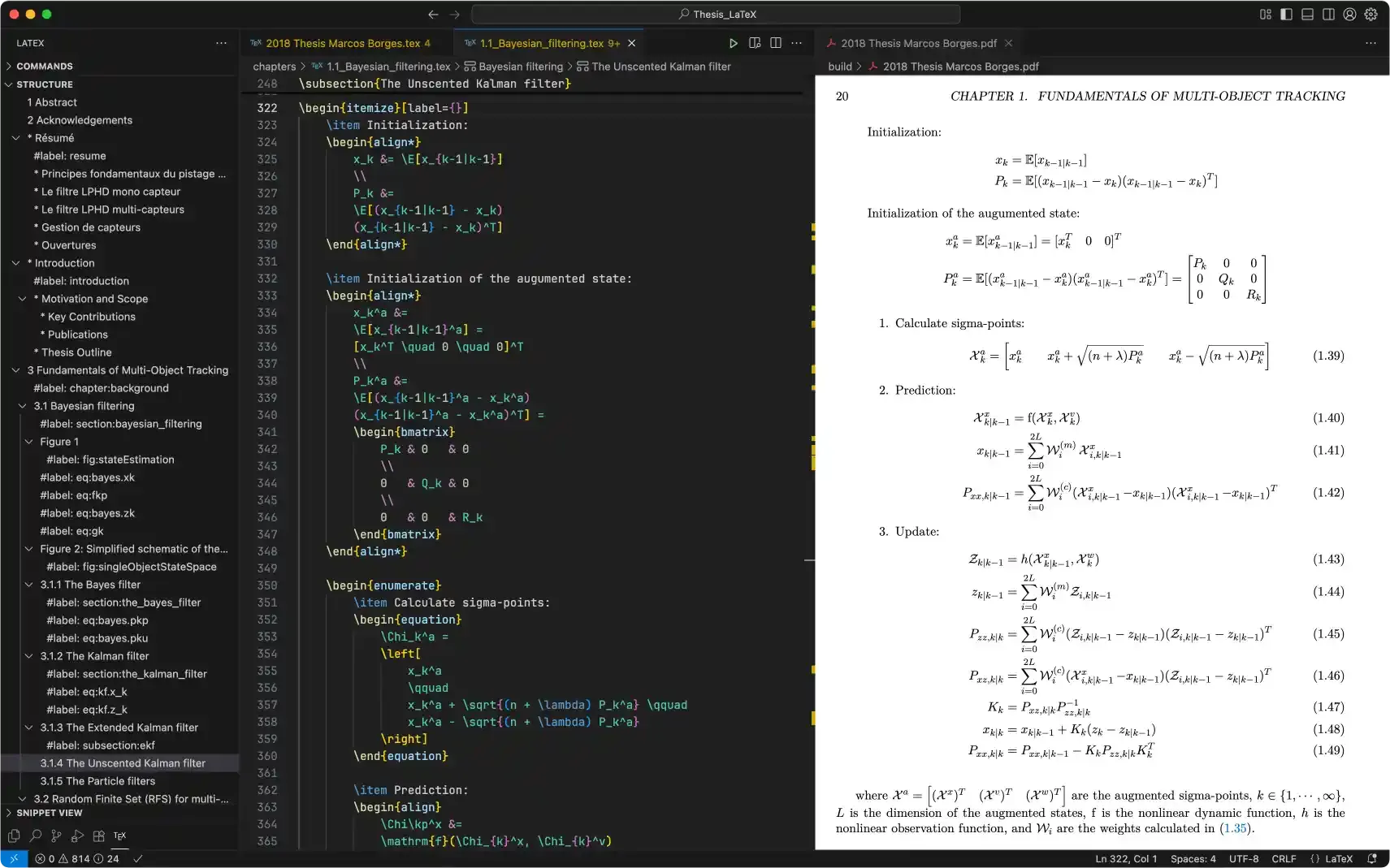
I’ve tried several tools like Neovim, Zed, Cursor, and JetBrains editors. They’re all powerful, but given my needs and minimalist approach, VS Code remains my favorite editor. My second choice is Zed, which is still in development but might take the top spot soon.

Visual Studio Code is a lightweight yet powerful source code editor developed by Microsoft.
It comes with several built-in features that work without requiring additional extensions, including support for Docker, Git, HTML, CSS, JavaScript, TypeScript, JSON, Markdown, YAML, and more.
With extensions, you can add languages, debuggers, and tools to customize your setup and enhance your development workflow.
Live Preview
Live Preview allows you to preview static web projects within the editor or in an external browser.
LaTeX Workshop

LaTeX Workshop provides essential features for LaTeX typesetting.
Python

The Python extension adds editing and debugging support for Python.
C/C++
The C/C++ extension adds editing and debugging support for C/C++.
rust-analyzer

rust-analyzer provides editing support for Rust.
bash <(curl -fsSL raw.githubusercontent.com/marcosborgesphd/mac-setup/main/install) vscodeSet up Homebrew environment
Paste that in the terminal prompt:
if [[ "$(/usr/bin/uname -m)" == "arm64" ]]; then HOMEBREW='/opt/homebrew' # ARMelse HOMEBREW='/usr/local' # Intelfieval "$(${HOMEBREW}/bin/brew shellenv)"Install VS Code
brew install visual-studio-codeAdd VS Code command to the terminal
SOURCE='/Applications/Visual Studio Code.app/Contents/Resources/app/bin/code'TARGET='/usr/local/bin/code'sudo ln -snf "${SOURCE}" "${TARGET}"Set VS Code as the default Git editor, diff, and merge tool
git config --global core.editor 'code --wait'
git config --global diff.tool vscodegit config --global difftool.vscode.cmd 'code --wait --diff $LOCAL $REMOTE'
git config --global merge.tool vscodegit config --global mergetool.vscode.cmd 'code --wait $MERGED'
Install Live Preview extension
code --install-extension ms-vscode.live-serverInstall Python extension
code --install-extension ms-python.pythonInstall C/C++ extension
code --install-extension ms-vscode.cpptoolsInstall rust-analyzer extension
code --install-extension rust-lang.rust-analyzerInstall LaTeX Workshop extension
code --install-extension James-Yu.latex-workshopBackup your VS Code settings
cp "${HOME}/Library/Application Support/Code/User/settings.json" "${HOME}/Downloads"Update your VS Code settings. Copy and paste that in the terminal
SETTINGS="$(cat <<'EOF'{    "window.newWindowDimensions": "maximized",    "window.title": "${folderPath}",
    "workbench.activityBar.location":"bottom",    "workbench.startupEditor": "newUntitledFile",
    "extensions.ignoreRecommendations": true,    "telemetry.telemetryLevel": "off",
    "editor.fontFamily": "JetBrainsMono Nerd Font",    "editor.fontSize": 14,    "editor.rulers": [80, 120],    "editor.minimap.enabled": false,
    "terminal.integrated.fontFamily": "JetBrainsMono Nerd Font",    "terminal.integrated.fontSize": 14,
    "files.trimTrailingWhitespace": true,    "files.associations": { "*.mdx": "markdown" },
    "latex-workshop.latex.recipe.default": "Latexmk (LuaLaTex)",    "latex-workshop.latex.outDir": "./build",    "latex-workshop.latex.recipes": [        { "name": "Latexmk (LuaLaTex)", "tools": ["latexmk (lualatex)"] }    ],    "latex-workshop.latex.tools": [        {            "name": "latexmk (lualatex)",            "command": "latexmk",            "args": [                "-lualatex",                "-shell-escape",                "-synctex=1",                "-interaction=nonstopmode",                "-output-directory=./build",                "%DOC%"            ]        }    ]}EOF)"
echo "${SETTINGS}" > "${HOME}/Library/Application Support/Code/User/settings.json"